How to Make a Cricket Points Table for Your Tournament, Free
Four teams, one Sunday, one place in the final. Set the table up right before the first ball so nobody argues at the end.
To make a cricket points table, choose the format (series, tri-series or round robin), agree the points for a win, tie and no result, and set the overs a side before the first match. Then enter each result as runs, wickets and overs for both teams. The table needs played, won, lost, tied, no result, points and net run rate (NRR) for every team. The free TapTurf Cricket Tournament Manager does all of this in your browser, with no sign-up, and recalculates the whole table every time you add or edit a match.
Most arguments at the end of a turf league come from rules nobody agreed at the start: what a washout is worth, whether an all-out side gets its full overs, and who goes through when two teams finish level. This guide walks through the setup in order, with a worked four-team example.
Set up your league, tri-series or round robin in a minute.
Open the tournament managerWhich tournament format should I pick?
- Bilateral series: two teams playing a few matches. The tool shows a series score such as "Titans 2 - 1 Strikers" instead of a table, with each side's NRR underneath.
- Tri-series: exactly three teams, with a full points table and NRR.
- Round robin: three to ten teams, where everyone plays everyone. You add teams one at a time with + Add a team.
A single round robin needs n x (n - 1) / 2 matches, where n is the number of teams. Four teams need 6 matches, six teams need 15, eight need 28 and ten need 45. At a turf booked by the hour, that number decides the format more than anything else. Short games of 5 or 6 overs a side are what make a six-team round robin possible in one long booking.
What points should a win, tie and no result get?
The usual system is 2 points for a win, 1 for a tie or no result and 0 for a loss. That is what the ICC Men's T20I Playing Conditions set for leagues of more than two teams, and the same values apply in the ICC Men's T20 World Cup 2026 groups. The TapTurf tool starts with these values. To change them, open Points and overs settings on the first screen and edit Win, Tie and No result. A loss is always 0.
Why should I set overs a side before I start?
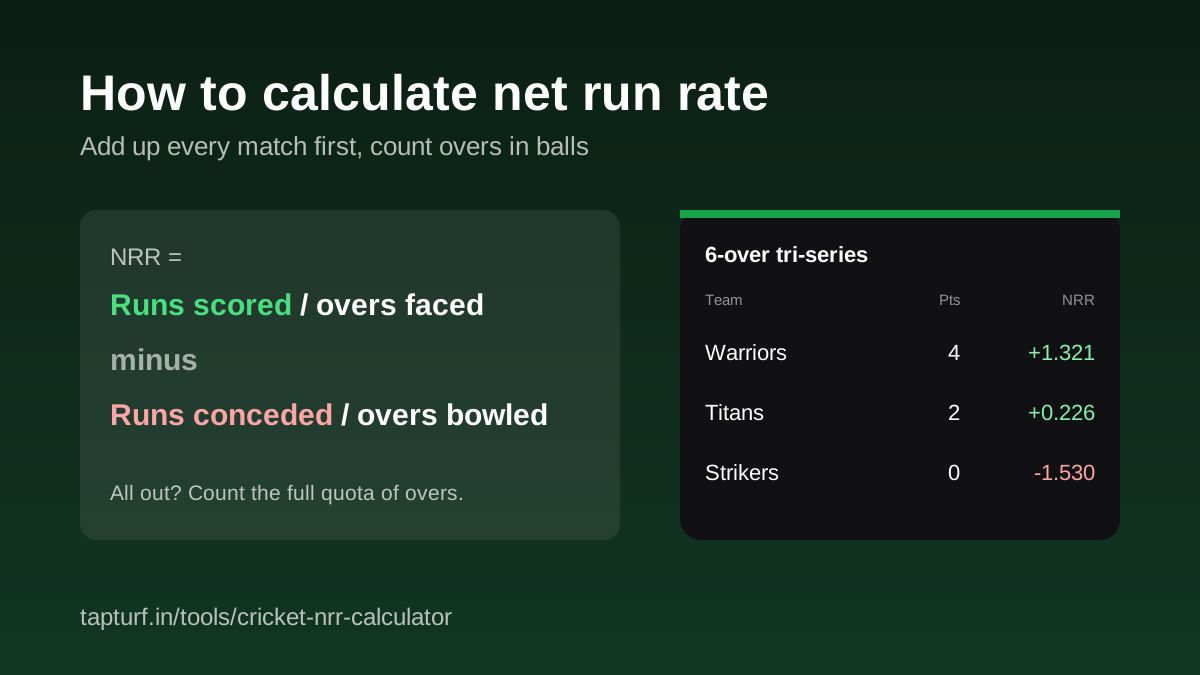
Because of the all-out rule. Under ICC playing conditions, a team bowled out before its overs run out is counted as having faced its full quota for NRR, for example 6 overs in a 6-over match, not the 4.3 overs it lasted. The tool can only apply this if it knows the quota.
Forgot to set it and already entered a few results? You have two options. Press Reset and start again with Overs a side filled in, which clears every match. Or, for each all-out innings, type the full quota (for example 6) in the overs box. NRR comes out the same, but the match list will then show 6 overs for that innings instead of the overs it really lasted.
How do I enter each match result?
- Press Add match and pick Team A and Team B from your list.
- Enter runs, wickets and overs for both innings. Write overs the cricket way: 4.3 means four overs and three balls. Tick All out for a side that was bowled out.
- Choose who batted first, so the result reads correctly, for example "won by 23 runs" or "won by 6 wickets".
- Leave Result on From the scores, or override it for a Super Over, a result your league decided another way, or No result.
- Press Add match. Use the pencil to edit a match and the bin to delete one; the table is worked out again from scratch.
Ties and washouts need one decision each. If your league plays a Super Over, set Result to the team that won it, so it gets the win points. Enter only the main innings, because the ICC T20 World Cup 2026 conditions leave the Super Over out of NRR. If a match is washed out or not played, choose No result: both teams get the no-result points, no scores are needed, and the match is left out of NRR.
What does a finished points table look like?
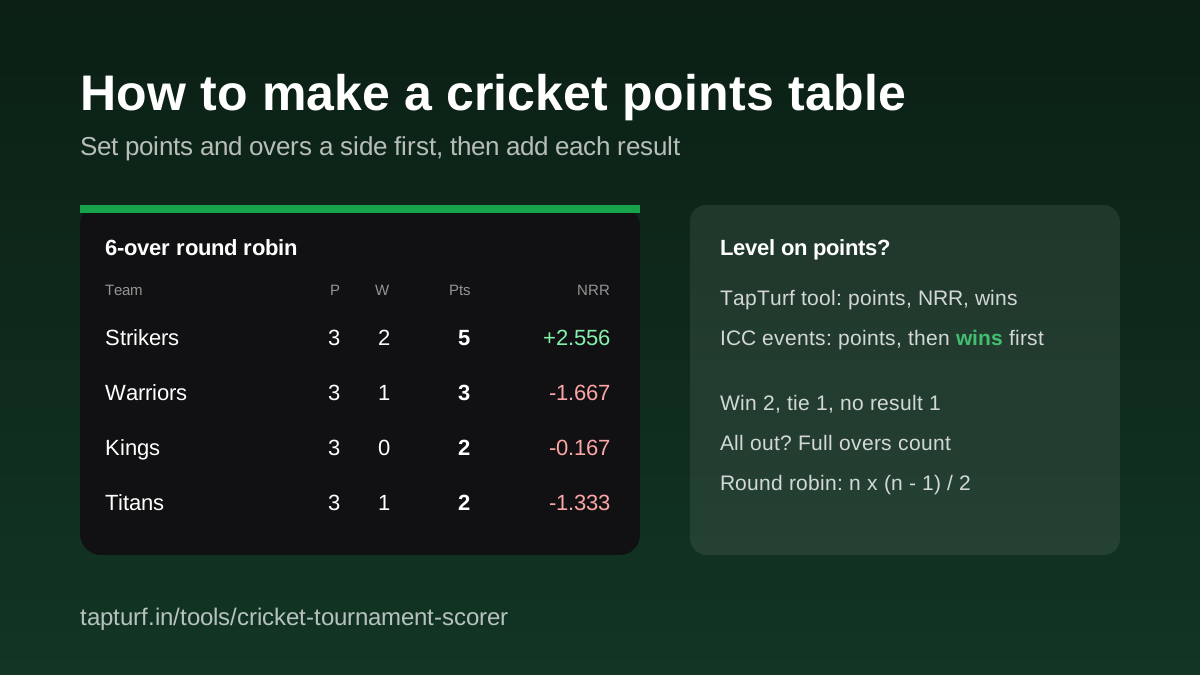
Here is a made-up 6-over round robin between four turf teams, with 2 points for a win and 1 for a tie or no result. Strikers 74/3 beat Titans, who were all out for 51 in 5.1 overs. Warriors v Kings was washed out. Warriors 61/4 beat Titans 58/6. Kings and Strikers both made 58, a tie. Titans 64/4 chased down Kings' 62/5. Strikers 64/6 bowled Warriors out for 41 in 4.3 overs.
| Team | P | W | L | T | NR | Pts | NRR |
|---|---|---|---|---|---|---|---|
| Strikers | 3 | 2 | 0 | 1 | 0 | 5 | +2.556 |
| Warriors | 3 | 1 | 1 | 0 | 1 | 3 | -1.667 |
| Kings | 3 | 0 | 1 | 1 | 1 | 2 | -0.167 |
| Titans | 3 | 1 | 2 | 0 | 0 | 2 | -1.333 |
The all-out rule matters here. With Overs a side left blank, the two all-out innings count at 5.1 and 4.3 overs, and Strikers' NRR falls from +2.556 to +1.314 while Warriors' improves from -1.667 to -0.452. The order does not change in this example, but in a tighter league it easily can. The NRR guide linked below shows the full sum.
Who goes through when two teams are level on points?
The TapTurf tool sorts by points, then NRR, then wins, which is how many local leagues settle it. ICC events put wins first. The ICC Men's T20I Playing Conditions rank teams level on points by most wins, then wins in matches between the tied teams, then NRR. The ICC Men's T20 World Cup 2026 conditions use most wins, then NRR, then the head-to-head match.
In the example, Kings and Titans both have 2 points. The tool puts Kings third because their NRR is better (-0.167 against -1.333). Under the ICC order, Titans would be third, because they won a match and Kings did not; Kings' points came from a tie and a washout. If your league follows the ICC order, check the W column whenever teams finish level on points, and agree the rule with every captain before the first match.
Can players follow the table on their phones?
The tournament is saved in your browser's local storage on the device you use, so closing the tab or refreshing brings it back. It is not uploaded and other people cannot see it. To share it, use "Go live: share a link" under the match list. That turns the tournament into a live page, results and table included, that anyone with the link can follow. Clearing site data or switching phones starts the offline version fresh, so pick one person and one phone to keep the table.
Need the maths behind NRR, with the all-out rule worked through?
Read the NRR guideSplitting a big group into teams for the league? Make them fair first.
Read the team split guideWant a scorecard image for each match?
Read the scorecard guideNeed a ground for the tournament?
Find a box cricket turfHow many points is a win in a cricket tournament?
How many matches does a round robin need?
Why can't I see the All out box?
Does a no-result match count in NRR?
Is NRR or number of wins used first to break a tie on points?
Sources
- ICC, Men's T20I Playing Conditions, effective October 2026, clause 16.10.1 Points and 16.10.2 Net run rate (confirmed, opened 5 November 2026)
- ICC, Men's T20 World Cup 2026 Playing Conditions, clauses 16.10.3 Points, 16.10.4 Progression and 16.10.7 Net run rate (confirmed, opened 5 November 2026)
- Firstpost, "T20 World Cup 2026 points table rules: Net Run Rate, tie-breakers and everything else you need to know", 5 February 2026 (reported)
- TapTurf, Cricket Tournament Manager (tool page, checked 5 November 2026)
Points values, the all-out rule, the no-result and Super Over NRR rules and the tie-break orders are taken from the ICC documents above; Firstpost is a secondary report of the same rules. The round robin is a made-up example, worked out with the code that runs the TapTurf tool.
Like this post? Tell Google you want to see more from TapTurf.
 Add TapTurf as a preferred source on Google (opens in a new tab)